
Know every asset. Prove every job.
For facility managers and building owners, and the technicians and contractors who keep their buildings running. An iPhone and iPad app at the asset, a web console in the office.
The problem, in plain words
What is in the building?
The manuals are lost, the nameplates are faded, and the real asset list lives in the head of one veteran engineer.
What is due, and was it done right?
PM intervals, inspection dates and warranty deadlines sit in three different places. You find out something is overdue when someone calls.
Can you prove it?
When the auditor or the insurer asks, your team rebuilds the record from emails and paper the week before.
785
From May 2024 to May 2025, Joint Commission hospital accreditation surveys flagged utility system control labeling 785 times and utility system testing 684 times as needing improvement. In Texas, elevator maintenance records and manuals for each make and model have to be accessible in the building. The record has to exist, and someone has to be able to find it.1
1 The Joint Commission, "Updated Accreditation Manual: Physical Environment Chapter", webinar transcript, September 2025; Texas Administrative Code, 16 TAC §74.68. Both accessed October 20, 2026.
One rooftop PM, from due date to audit record
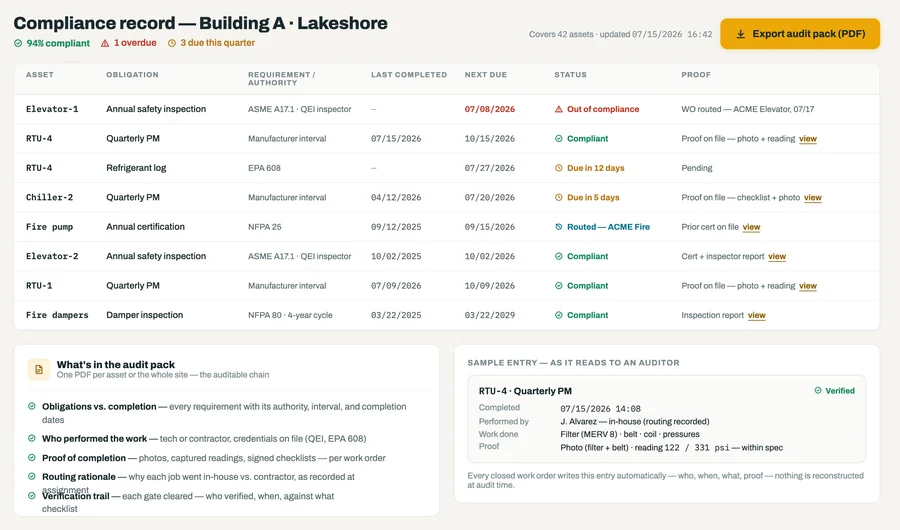
Building A, a sample site. Quarterly preventive maintenance (PM) and a refrigerant log on rooftop unit RTU-4. Sample data throughout.
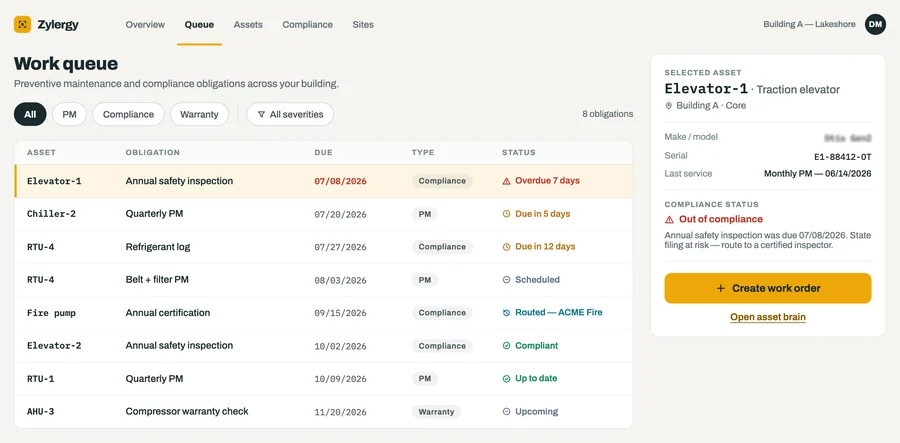
It shows up in the queue
PM, compliance and warranty items land in one queue, sorted by risk: the overdue elevator inspection on top, the rooftop unit's work right behind it.
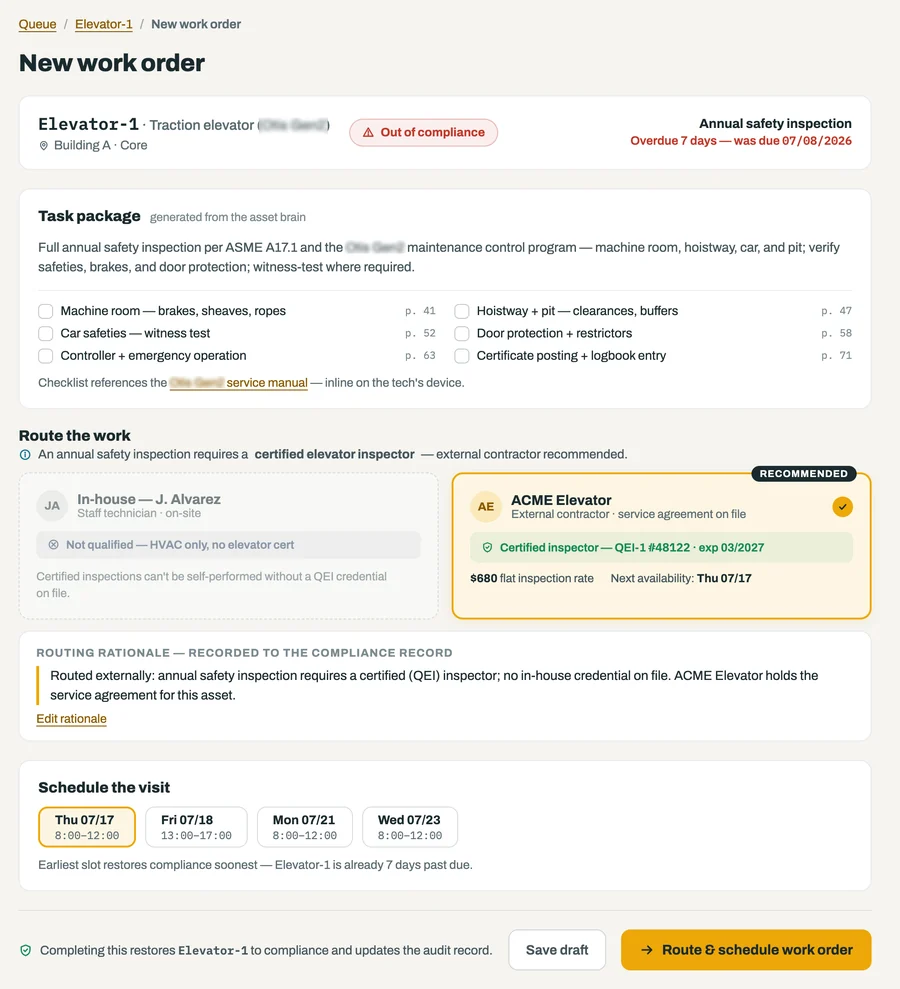
It goes to someone qualified
The work order carries a task package built from the asset brain, and routing checks credentials before it assigns. The rooftop PM stays in-house, while certified work like the elevator inspection in this frame goes only to a contractor with the credential on file, and the reason goes on the record.
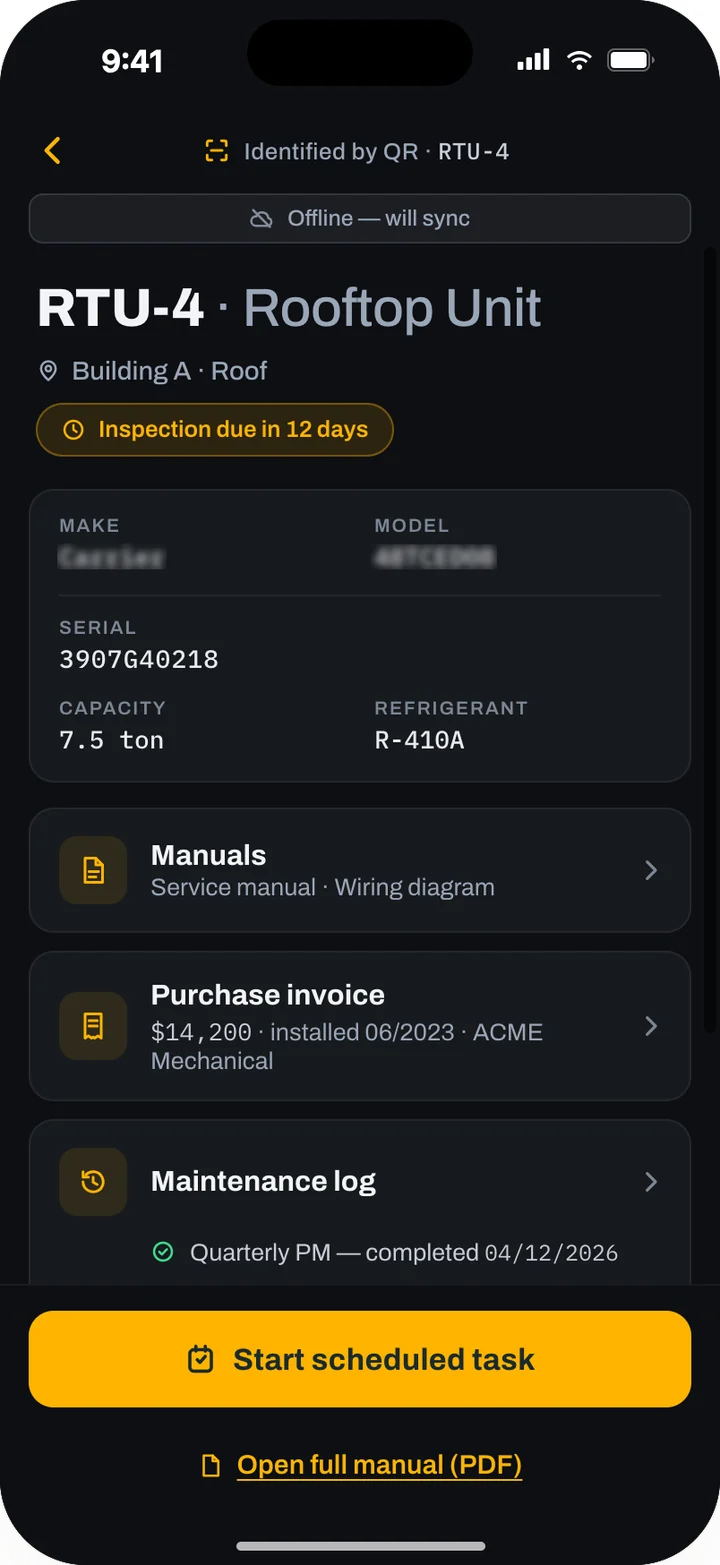
The technician scans the unit on the roof
One scan opens the asset brain: model, serial, tonnage, refrigerant, the manuals, the purchase invoice, the maintenance log and what is due. It works with no signal on the roof and syncs when the technician is back inside.
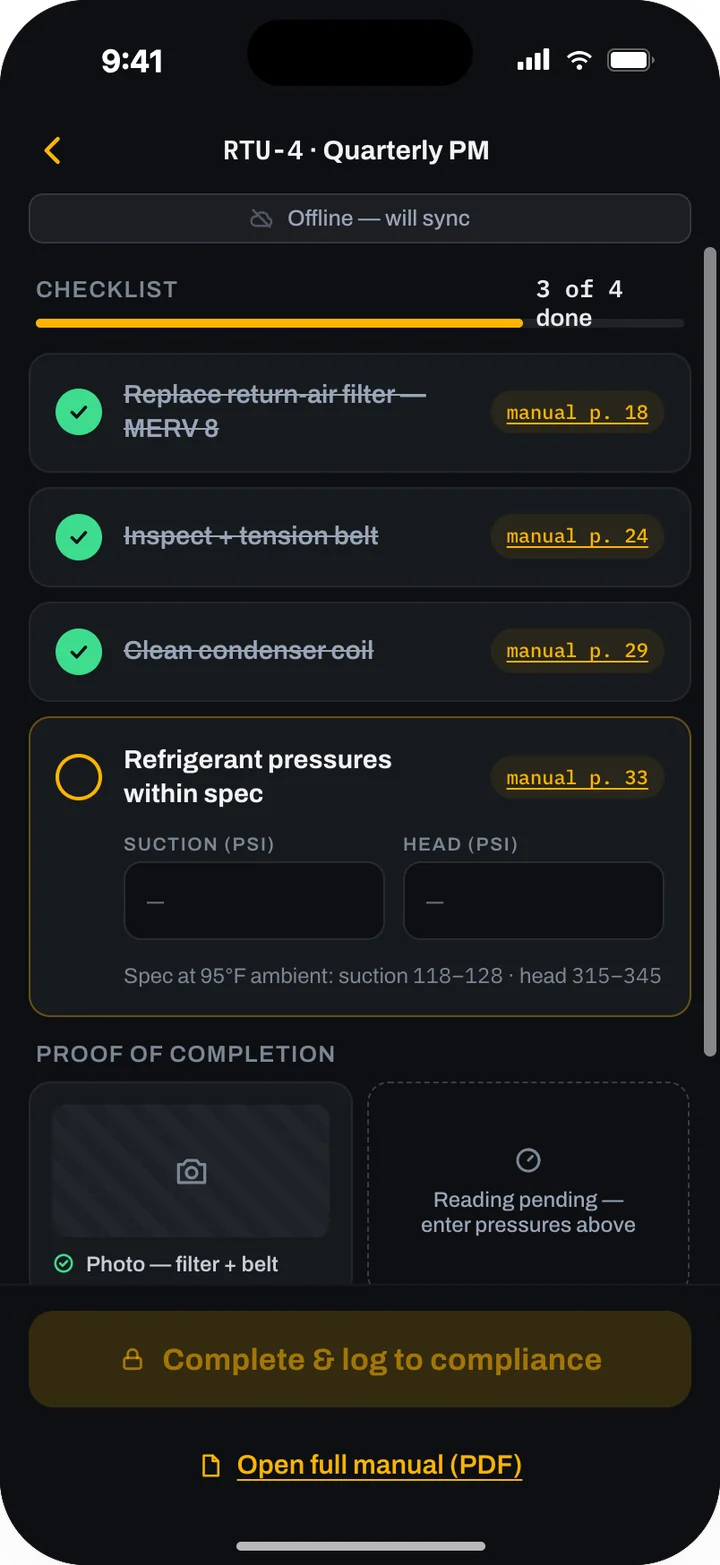
The checklist runs, and the proof goes in
Each step links to its manual page. Suction and head pressure go in against the manufacturer's range, the photo goes in, and the job cannot close until the proof is there.
The record writes itself
Closing the job writes the compliance entry: who did it, with what credential, when, what was done, and the photo and readings. The audit pack for the asset or the whole site exports in one click.
Built for the owner's side of the record
The credential, checked before the work is assigned
Certified work goes only to an in-house technician or a contractor whose credential is on file and current, and the reason for each choice is recorded.
Your own record, whoever does the work
Your contractors keep filing official reports where your city or the state requires them. Zylergy Facilities keeps your own record of the same work, with the photos, readings and credentials behind it.
No proof, no close
A job stays open until the photos and readings are in and the readings fall inside the manufacturer's range.
What it does
Agent marks work an AI agent runs. Model marks work a trained model does. How our models work
QR-tagged asset records Model
Every serviceable asset gets a record and a QR tag: make, model, serial, location, specs, owner and purchase invoice. A model reads the nameplate from a photo; a person confirms the values.
Point and identify Model
No tag yet, or a tag you cannot reach? Point the camera at the asset. When the match is not certain, the app asks you to confirm and never opens the wrong record.
The asset brain
Each asset's manuals, purchase invoice, maintenance log and compliance status are on the phone at the asset and in the console at the desk. It is everything your building knows about that asset, in one place, and it stays when the veteran engineer retires.
PM schedules from the manual Model
Service intervals are read from the manufacturer's manuals and seed the PM schedule. You can edit any of them, and every trigger points back to the manual page it came from.
Compliance tracked to its authority
Each obligation is tied to its requirement, such as ASME A17.1 for elevators, EPA Section 608 and AIM Act rules for refrigerant logs, NFPA 25 for fire pumps and NFPA 80 for fire dampers. Each obligation has due dates, warranty deadlines and a status: compliant, due soon, overdue.
One risk-sorted queue
PM, inspections and warranty work in one inbox, sorted by what is at risk. Filter by type or severity. Overdue stands out.
Credential-gated routing Model
Turn an obligation into a work order with a task package generated from the asset brain: scope, checklist and manual pages. Route it in-house or to a contractor. Certified work cannot go to anyone without the credential on file, and the reason for each routing choice is recorded.
Proof gate and audit packs
Completion stays locked until the photos and readings are in and the readings are inside the manufacturer's spec. Every closed job writes its own entry to a tamper-evident, append-only log. Export the audit pack per asset or per site.
In the field. In the office.
At the asset
The building engineer, the in-house technician or the contractor:
- Scans the QR tag or points the camera at the asset.
- Reads the specs, the manuals, the invoice and the last PM before touching anything.
- Starts the scheduled task and works a short checklist with the manual page on every step.
- Enters readings against the spec and takes the proof photo.
- Works in a mechanical room or an elevator machine room with no signal. Everything syncs later.
At the desk
The facility manager:
- Works one queue for the building, sorted by risk.
- Creates work orders and routes them to the right person, in-house or contractor.
- Sees every closed job arrive with its proof and its compliance entry.
- Exports the audit pack for an asset or a site.
The owner and the asset manager:
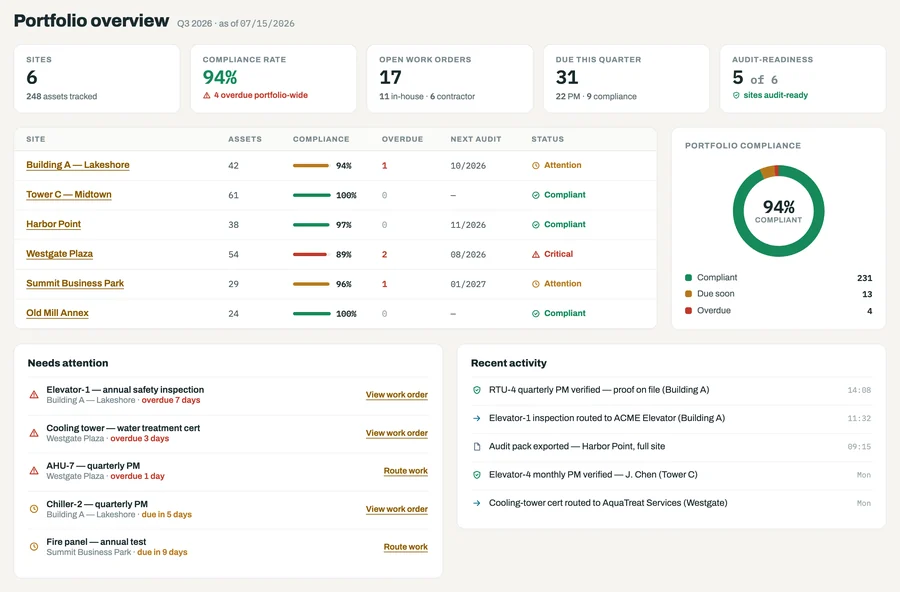
- See each site as compliant, due or overdue, with open work in-house and with contractors.
- Read what needs attention across the portfolio and what was verified this week.
Works with what you have
Your CMMS or IWMS
Zylergy Facilities runs above it. It reads your assets, schedules and work orders, and writes completion and compliance back. No CMMS? It runs as your system of record. Which systems it connects to
Your manuals
The manufacturer manuals you hold, as PDFs or scans, loaded into your own library and read for service intervals.
Your contractors
The service agreements and credentials of the firms you already use are on file. Those firms keep filing official inspection reports where your jurisdiction requires, for example in The Compliance Engine or the state's elevator reporting system.
Your parts suppliers
Parts requests go to your supplier, on your own account.
Your sign-in
Single sign-on and role-based access, with permissions per site, asset and contract.
Your data, your record
Your asset records, manuals, photos and compliance history belong to you. Your manuals sit in your own library, and every access to them is logged. Contractors see only the assets you authorize. Every task package and every interval points back to the manual page it came from, a person decides who does the work, and no job closes without proof.
How it starts
Zylergy Facilities is in early access. Join, and our engineers set it up at your sites.
They walk your sites, tag the assets in scope, read the nameplates, load your manuals and the obligations that apply, connect your CMMS and your contractor list, and put the app in your team's hands. Your team works on your own assets, and you work directly with the engineers who build the product. After early access it runs on the Zylergy Facilities subscription.
The quick start, operator and admin guides are published. Read the Zylergy Facilities guides.
Questions
Does it replace our CMMS?
No. It runs above the CMMS you have: it reads your assets and work orders, adds the asset brain, compliance tracking and the proof, and writes completion back. If you have no CMMS, it runs as the system of record on its own.
Which assets and obligations does it cover?
Elevators, rooftop units, chillers, air handlers, fire pumps, fire dampers and cooling towers, among others. Obligations include the manufacturer's PM intervals, warranty deadlines, and inspections tied to their requirement, such as ASME A17.1, EPA Section 608 and AIM Act refrigerant rules, NFPA 25 and NFPA 80.
How does credential-gated routing work?
You keep each contractor's credentials and service agreement on file, with expiry dates, and record your in-house team's certifications the same way. When a job needs a certified executor, routing will not assign it to anyone without that credential. The console recommends who is qualified and available, and the reason for the choice goes on the record.
Will an auditor accept the audit pack?
That is the auditor's call. The pack gives them the evidence in one document: each obligation against its completion, who did the work and with what credential, the photos and readings, the routing reason and the verification trail. Nothing in it is reconstructed after the fact.
Does it work where there is no signal?
Yes. Scanning, the asset brain, the checklist and proof capture work offline in mechanical rooms and on roofs. The app shows when it is offline and syncs when it reconnects.
What does early access cost?
We agree on the terms with each early-access customer. Custom engagements are priced separately and start with a First Build.
Related products
Custom engagements. Engagements that run on Zylergy Facilities: Asset register and contractor portal · Inspection deficiency to quote · Maintenance job packages.
See forward-deployed engineering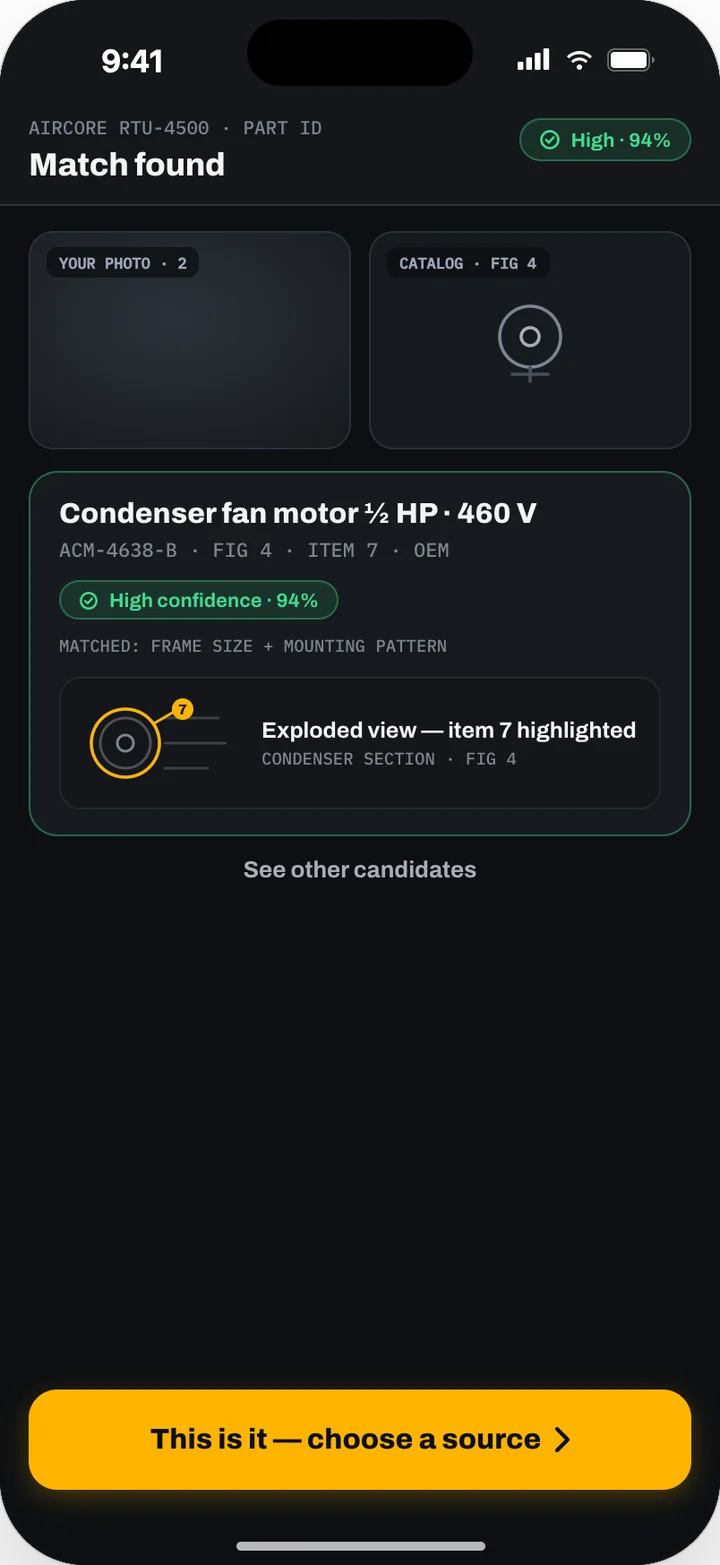
Zylergy Field
Part identification from a photo, diagnosis cited to the manual, parts ordering and guided repair.
See Zylergy Field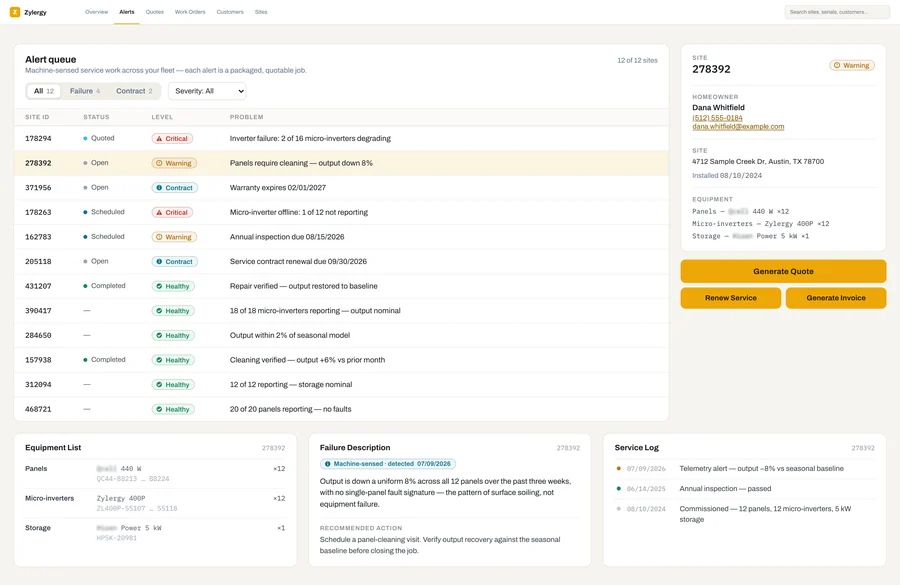
Zylergy Solar
Inverter and battery alerts become quotable service jobs, fixed in one visit.
See Zylergy SolarProduct screens show sample data.
Bring us one building.
Tell us what is in it and what is due. An engineer will walk you through Zylergy Facilities and what we would set up in early access for your sites.