
Turn inverter alerts into service jobs you can sell.
For solar installers and service companies: the owner or sales lead and the office in the web console, technicians on iPhone and iPad, homeowners in their own portal.
The problem, in plain words
You hear about it from the homeowner.
A few panels drop out and nobody in the house can tell. The first sign is a higher grid bill, weeks later.
One repair, three trips.
One to look, one with the part, one to finish. Each truck roll eats the margin on the job.
Service is not a business yet.
New installs are no longer a steady line, and quoting and selling maintenance takes more time than it earns.
6.1%
The installer Freedom Forever held 6.1% of the US residential solar market in 2025, and its bankruptcy case was converted to a Chapter 7 liquidation in August 2026. SunStrong Management took over systems from earlier bankruptcies. Cash and loan customers that SunStrong does not service are referred to installers and repair companies in their area. More and more systems need a service company that did not install them.1
1 Wood Mackenzie, "US distributed solar installers, developers and equipment suppliers navigate unprecedented change in 2025", March 12, 2026; pv magazine USA, "Freedom Forever bankruptcy converted to Chapter 7 liquidation", September 9, 2026; SunStrong Management, Solar maintenance services; all accessed October 20, 2026. SunStrong Management, Company, accessed November 13, 2026.
One failing site, from alert to service plan
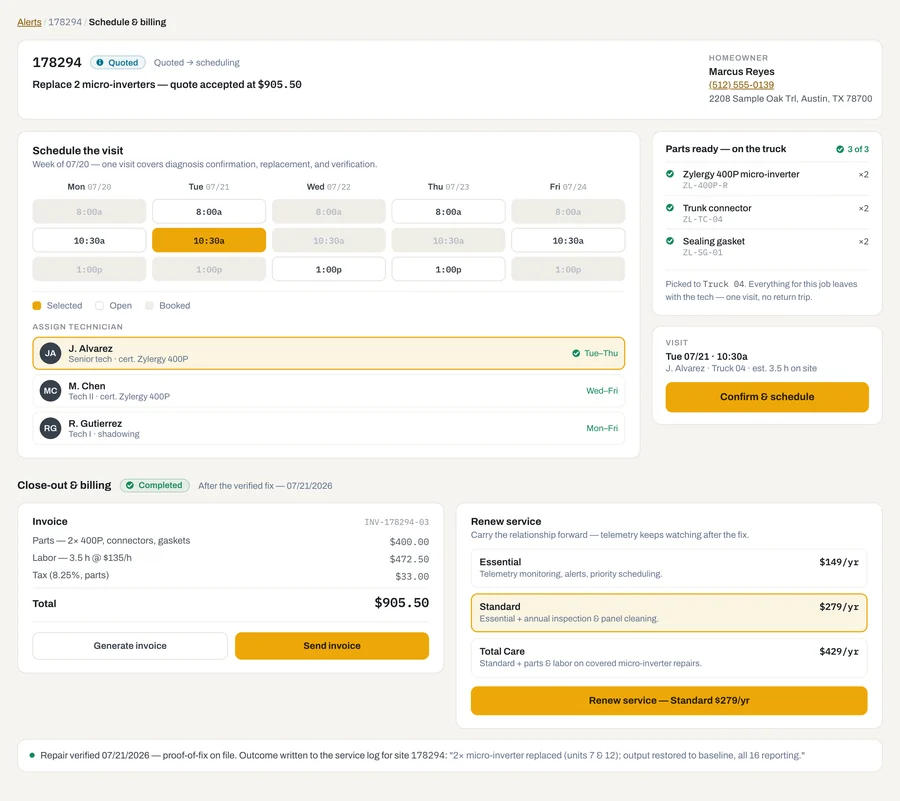
Site 178294. Two of sixteen micro-inverters degrading. Sample data throughout.
The alert arrives as a job
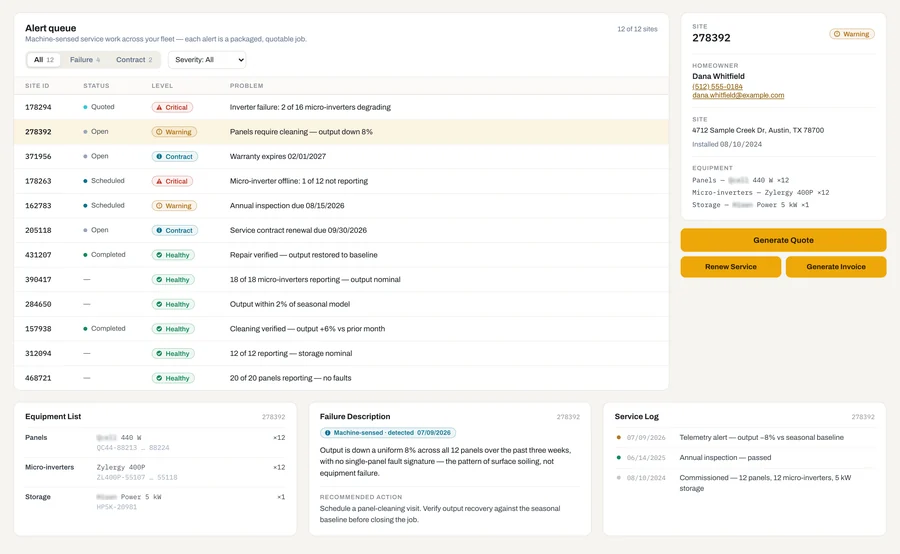
The fault reads in plain words, with the homeowner's contact, the installed equipment and the site's service log beside it, before the homeowner has noticed anything.
Generate the quote
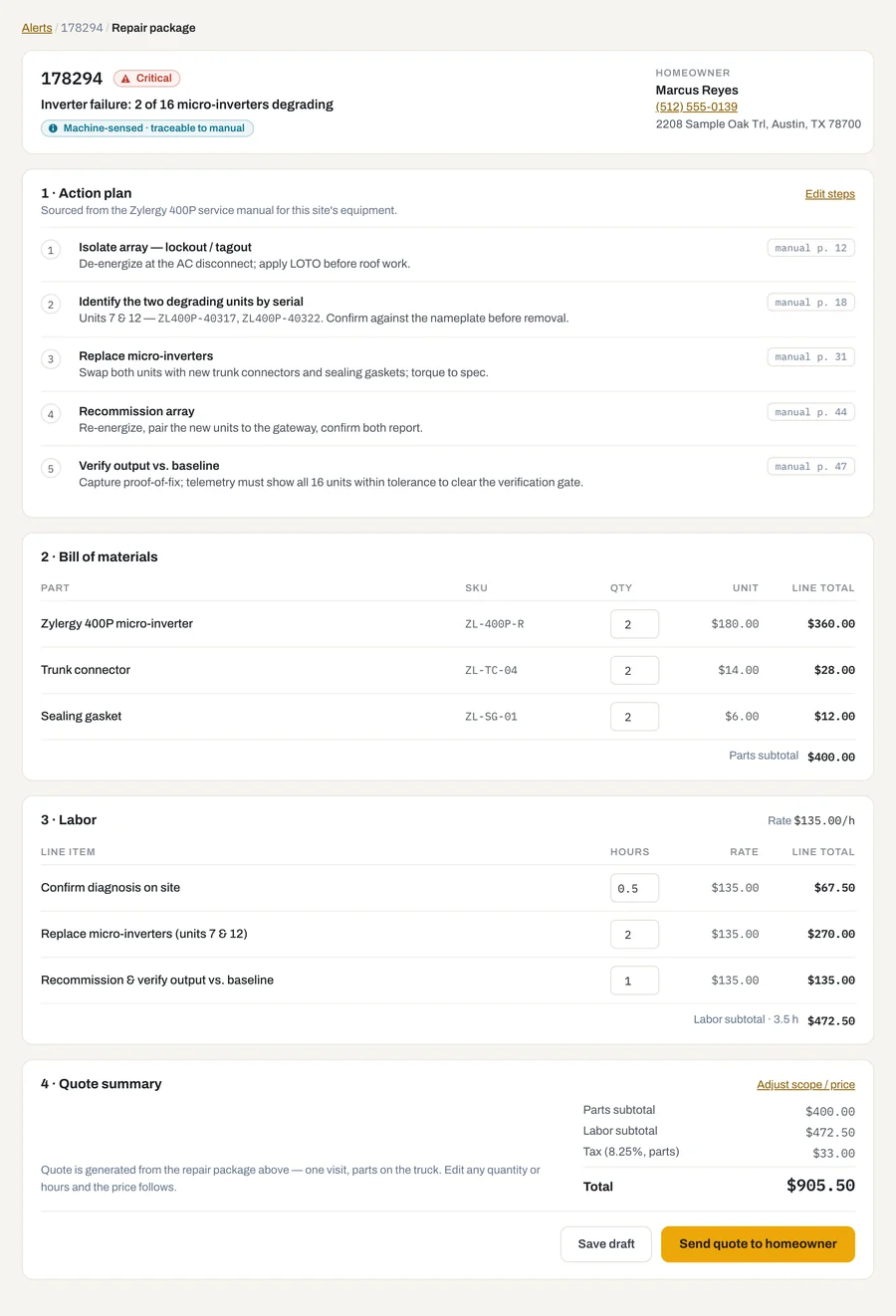
One click builds the package from the equipment manual and your own rates: action plan with manual page references, bill of materials, labor and price. When you edit a quantity, the total follows.
Call with a fixed price
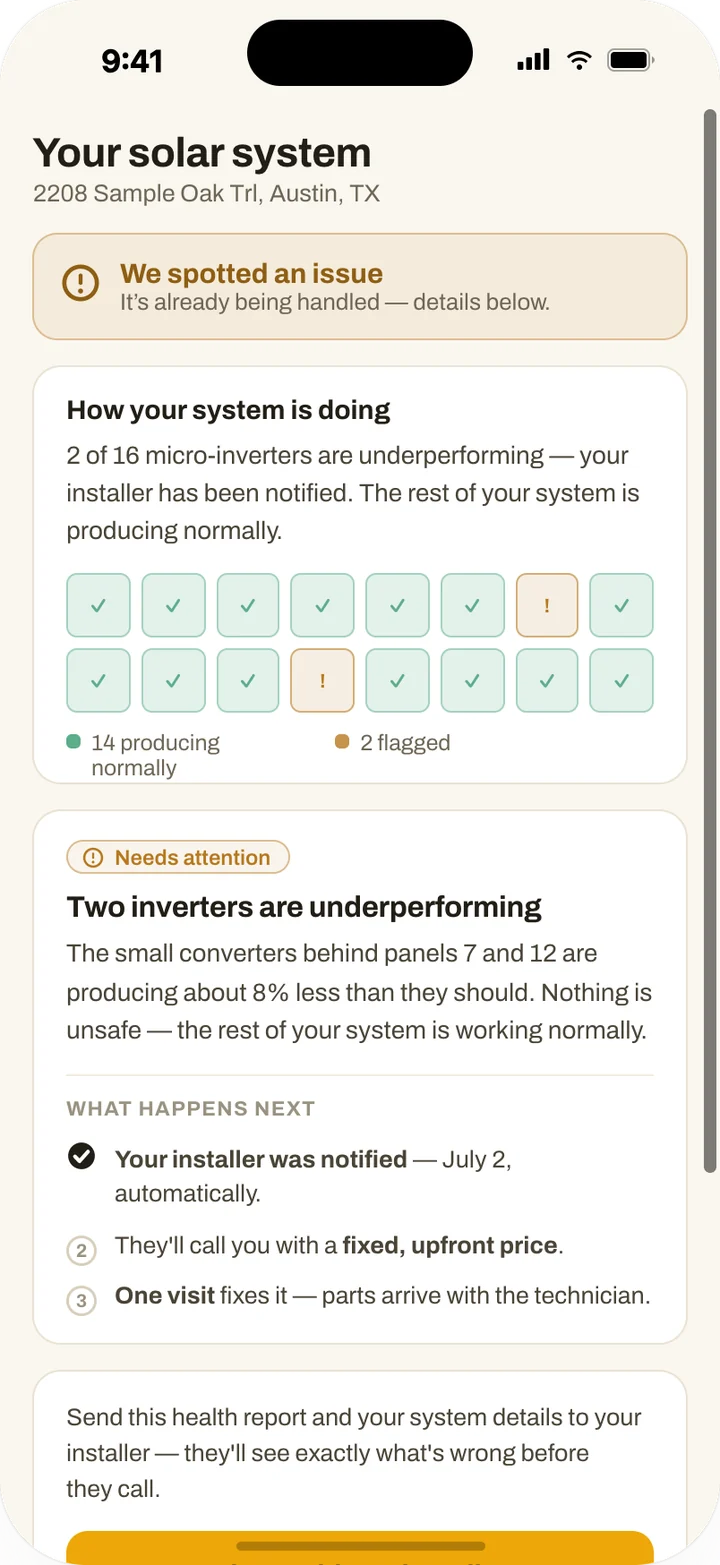
Before anyone drives out, the office calls the homeowner with a fixed price and sends a quote. The homeowner's portal shows which panels are flagged and what happens next.
Book one visit
Pick the slot, assign the technician, and confirm the parts are on the truck, so the job takes one visit.
Fix it once, with proof
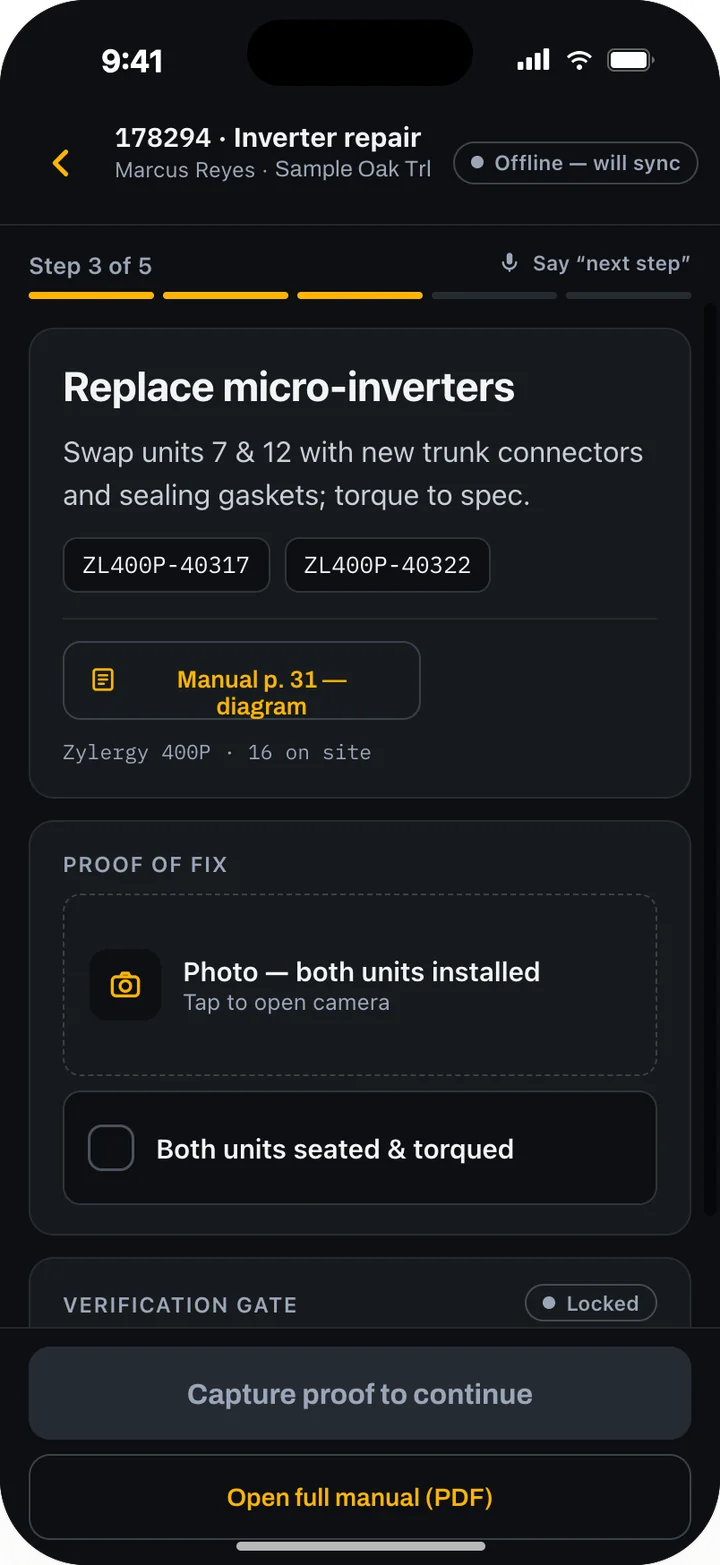
On the roof, the technician follows the steps with the manual page one tap away, takes the proof photo and completes the checklist. The job cannot close until the verification gate passes.
Invoice and offer a plan
The outcome goes into the service log, the job is invoiced, and the homeowner is offered a maintenance plan from your own catalog.
Built for a mixed fleet and a paid visit
One queue for every brand on your roofs
Each manufacturer's portal shows its own equipment. Zylergy Solar brings the monitoring platforms you connect into one queue, in one format, including systems you did not install.
Every actionable alert arrives as a priced job
The fault in plain words, the plan from the manual, the parts, the labor and a quote you can send. Your office calls the homeowner with a price before anyone drives out.
Fixed before it is billed
The technician captures the proof on the roof, and the job cannot close or be invoiced until the verification gate passes.
What it does
Agent marks work an AI agent runs. Model marks work a trained model does. How our models work
Fault detection from telemetry Agents
Four detection agents read your fleet's inverter and battery data. One tracks capacitor wear and estimates remaining life. One compares output against what the system should produce. One flags devices that have stopped reporting. One translates the manufacturer's notices. Each finding carries the component, the severity, how sure it is, and how long you have to act.
One queue of sellable work
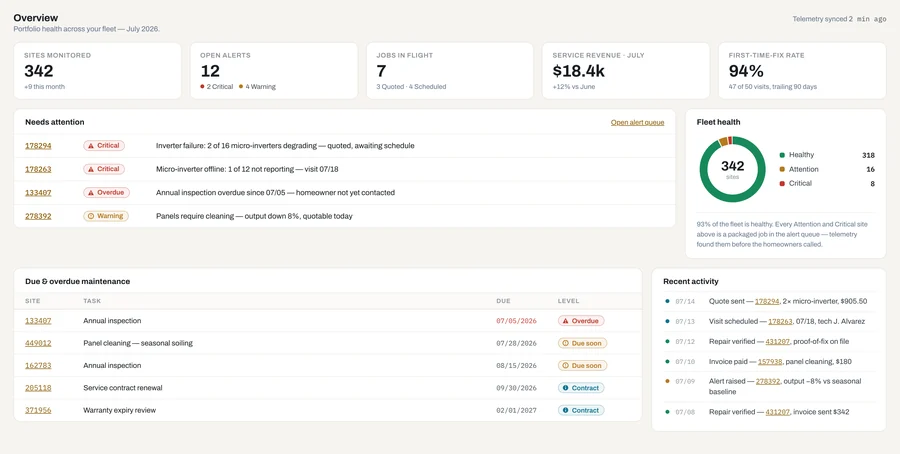
Failures, cleaning and inspection dates, warranty expirations and contract renewals in one list. Filter by failure or contract and by severity. Every row is a job you can quote.
Repair package and quote Agent
Each alert becomes a package: the fault in plain language, an action plan drawn from the equipment manual with page references, a bill of materials, labor from your rates, and an editable quote. Send it by link or PDF for the homeowner's sign-off.
One visit, parts on the truck
Schedule the job on your technicians' calendar, assign your own tech or a subcontractor, and confirm the parts are on the truck before it leaves. A stock list shows what to keep on the trucks for your installed base.
Guided repair with a proof gate
Step-by-step guidance on the phone, with serials and the manual page inline. A newer technician can do the repair alone. Photo and checklist proof are required, and the job cannot close until the verification gate passes.
Invoice and service plans
Invoice on verified completion. Build a catalog of maintenance plans from templates. Everyone on your team offers them the same way, as a line of business you own.
Homeowner portal
Homeowners see their system's health in plain language, panel by panel, and what happens next. If their installer is not on Zylergy Solar yet, they can share the site with their installer, and it lands in that installer's queue.
Nameplate onboarding Model
Photograph the nameplate, and the make, model and serial fill in, each with a confidence mark; low-confidence fields are flagged. Confirm, tag the equipment with a QR sticker, and the asset record is created. Existing fleets come online by linking the monitoring account or by bulk import, and telemetry starts only for sites with consent on record.
In the field. In the office.
On the roof
The technician:
- Photographs the nameplate to register new equipment, and tags it with a QR sticker.
- Arrives with the parts the package called for.
- Follows the steps with the serials and the manual page on the phone.
- Captures the proof photo and completes the checklist.
- Closes the job only when the verification gate passes. The outcome writes to the service log.
In the office
The owner or sales lead, and the office coordinator:
- Open the fleet view before the phones start: what needs attention, fleet health, what is due and overdue.
- Work the alert queue as a list of sellable jobs.
- Generate quotes, call homeowners with a fixed price, and send the quote.
- Book one visit and assign the technician or a subcontractor.
- Invoice the completed job and offer the service plan.
At home
The homeowner sees a plain health view of their system, which panels are flagged, and what their installer will do next.
Works with what you have
Inverter and battery monitoring platforms
Telemetry comes in through each manufacturer's published interface and is normalized into one device model, with consent recorded per site.
Your field-service system
Work orders go to your scheduling and invoicing system or print out. Which systems it connects to
Your price book and labor rates
Packages and quotes are priced with your numbers.
Your parts suppliers
You order parts from your own suppliers, on your own account.
Your equipment manuals
Manuals you hold, uploaded and read into each asset's record, so every package and every step can cite its page.
Your fleet, your customers
Your fleet data, customer records and service history belong to you, and so do the customer relationship and the service revenue. Telemetry flows only from sites with consent on record and stops when consent is withdrawn. Homeowners' monitoring credentials are held in a credential vault. Every package cites the manual page it was built from, a person in your office sends every quote, and no job closes without proof.
How it starts
Zylergy Solar is in early access. Join, and our engineers set it up for your company.
They connect your monitoring platforms, load your manuals, price book and labor rates, and bring your existing customers online. They tune the alert triage on your own history so the queue shows real faults, not noise. Your office works real alerts, and you work directly with the engineers who build the product. After early access it runs on the Zylergy Solar subscription.
The quick start, operator and admin guides are published. Read the Zylergy Solar guides.
Questions
Which inverter and battery brands does it read?
Zylergy Solar reads telemetry through each manufacturer's monitoring platform and puts it into one data model, so your queue looks the same whatever is on the roof. Batteries coupled to a hybrid inverter report through that inverter. Each manufacturer sets its own terms for fleet data access, and some now charge for it. During setup we list the platforms in your fleet, what access to each one costs, and which ones we connect.
Who owns the homeowner relationship?
You do. Zylergy Solar works for the installer: the homeowner portal tells the homeowner that you have been notified and what you will do next. When a homeowner whose installer is not yet on Zylergy Solar shares their site, it goes to their own installer, not to anyone else.
Can a newer technician really do these repairs?
Yes, with the guided steps. Each step carries the serials and the manual page, the proof is required, and the job cannot close until the verification gate passes. Your office sees the proof before it invoices.
Does it replace our monitoring portal or our field-service software?
No. It reads from the monitoring platforms you already use and sends work orders to the system you already schedule and invoice from. What it adds is the step in between: turning an alert into a priced job and closing it with proof.
What does early access cost?
We agree on the terms with each early-access customer. Custom engagements are priced separately and start with a First Build.
Related products
Custom engagements. The engagement that runs on Zylergy Solar: Inverter alert to service job.
See forward-deployed engineering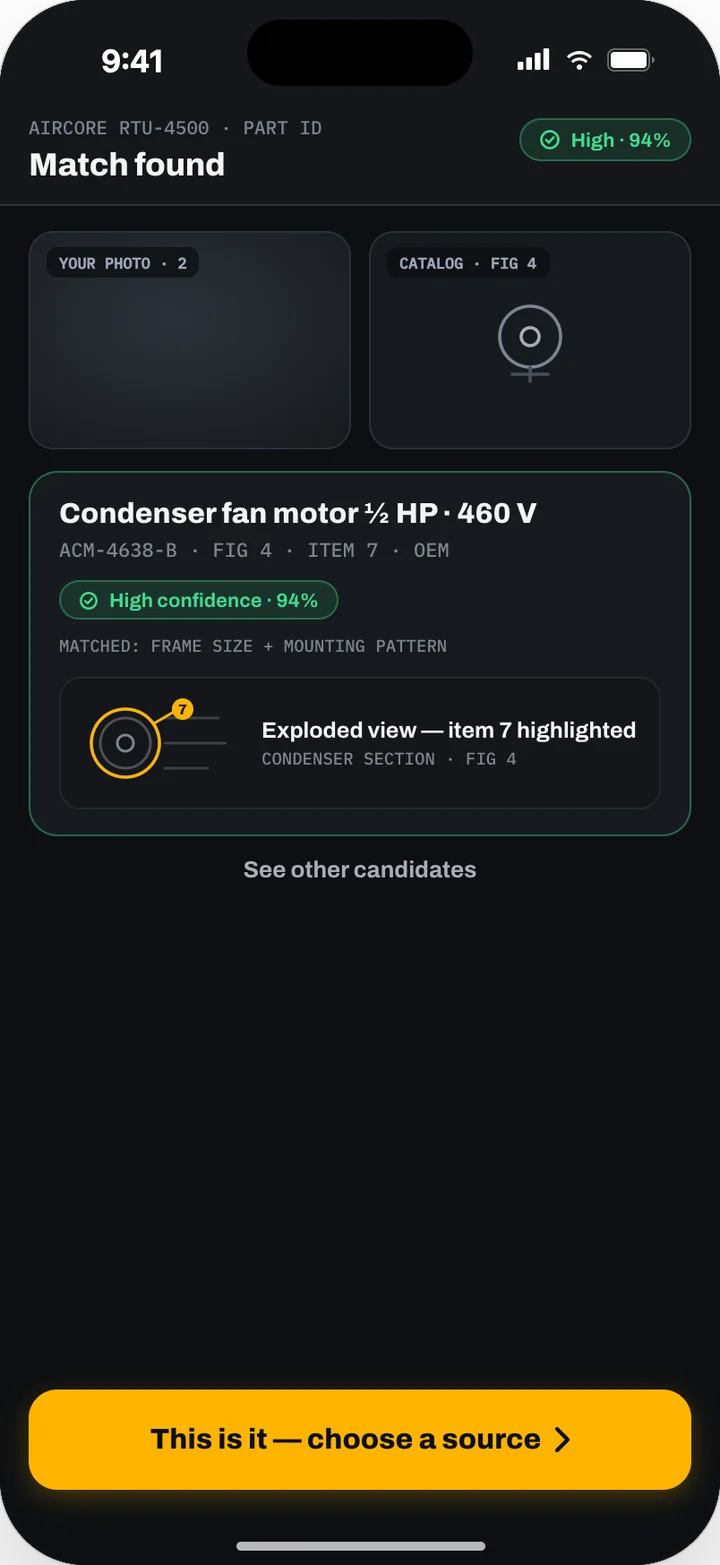
Zylergy Field
Part identification from a photo, diagnosis cited to the manual, parts ordering and guided repair.
See Zylergy Field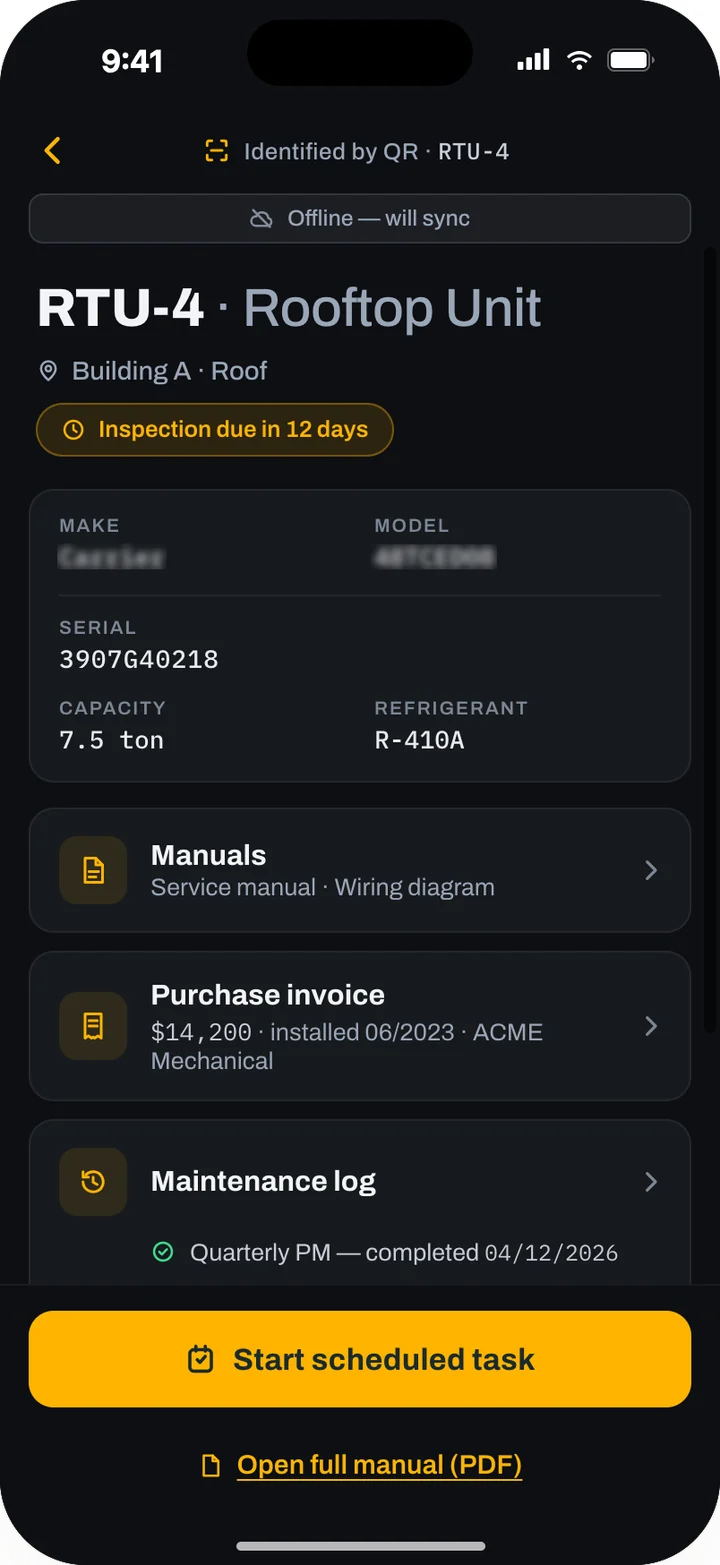
Zylergy Facilities
QR-tagged asset records, compliance scheduling, credential-gated contractor routing and audit packs.
See Zylergy FacilitiesProduct screens show sample data.
Sense it. Package it. Fix it once.
Tell us how many systems you look after and what monitors them. An engineer will show you Zylergy Solar and what we would set up in early access for your fleet.